Token Pulse · a Widgetscape widget
Claude Code and Codex token usage, live on your Mac desktop.
Token Pulse is a desktop widget that shows how many tokens your AI coding tools have used today, this week or this month. It reads the session logs that Claude Code, Codex and nine other tools already write on your Mac, keeps only the counts, and sends nothing anywhere.
Free 14-day trial · macOS 14+ · Apple silicon · No API key
What Token Pulse shows
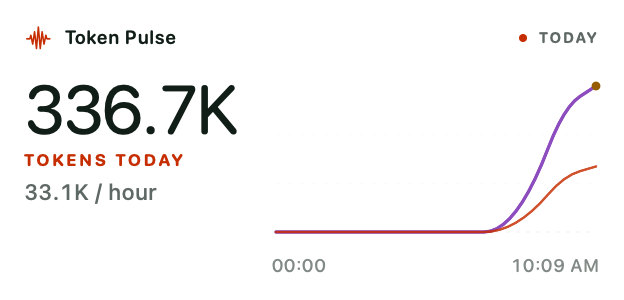
- Total tokens for today (hour by hour), the last 7 days or the current month.
- A curve per tool, or the split by token type: input, output, cache read and cache write (and reasoning, where Codex reports it).
- Requests and burn rate, so you can see a busy session as it happens.
- Four faces: Flowline (usage moving through time), Stacked (token types as layered streams), Bars (precise interval comparison) and Minimal (the total and one quiet trend), in Flowline, Theme or Graphite colours.
- An optional cost line, off by default. Claude Code and Codex logs contain no cost, so for them it is an estimate from a rate per million tokens that you enter. A few tools write a cost into their own logs, and Token Pulse shows that figure when it is there.
It updates as your tools write new usage — there is no polling of any service and no account to sign in to.
Supported AI coding tools
Claude Code and Codex are on by default. Turn on any of the others in the widget’s Content tab. Token Pulse reads these folders in your home folder:
| Tool | Where Token Pulse reads it |
|---|---|
| Claude Code | ~/.claude/projects, ~/.claude/transcripts |
| Codex | ~/.codex/sessions, ~/.codex/archived_sessions |
| Gemini CLI | ~/.gemini/tmp |
| OpenCode | ~/.local/share/opencode |
| OpenClaw | ~/.openclaw/agents |
| Pi | ~/.pi/agent/sessions |
| Oh My Pi | ~/.omp/agent/sessions |
| Cline | its VS Code task folder |
| Roo Code | its VS Code task folder |
| Kilo Code | its VS Code task folder |
| Cursor | an existing tokscale usage cache, ~/.config/tokscale/cursor-cache |
If a tool keeps no log on your Mac — a chat in a browser, for example — Token Pulse can’t see its usage.
Private by design
Session logs hold your prompts and code. Token Pulse reads them on your Mac and keeps only token counts, model names and timestamps; prompts, responses and file contents are never stored, and nothing is sent to us or anyone else. The widget’s Privacy tab says the same: “Stays on this Mac.”
Part of a desktop for people who build things
Token Pulse is one of 31 Widgetscape widgets. Next to it, Repo Pulse shows branches, uncommitted changes and recent commits in the repositories you choose, App Time how long you spend in each app, and System Pulse CPU, memory and thermal state.
Token Pulse is part of Widgetscape Pro — €9.99 + VAT, one-time, for up to 2 Macs. Every download includes a free 14-day trial of all widgets.
FAQ
Token Pulse questions
Does Token Pulse send my prompts or code anywhere?
No. It reads the session logs your AI tools already write on your Mac and keeps only token counts, model names and timestamps. Prompts, responses and file contents are never stored, and nothing is sent to us or anyone else.
Do I need an API key?
No. Token Pulse has no account and no API key: it reads local files. If a tool keeps no local log, Token Pulse can’t see its usage.
Does it show cost?
Only if you turn it on: the cost line is off by default. Claude Code and Codex logs contain no cost, so for them Token Pulse shows an estimate (“est.”) from a rate per million tokens that you enter. A few tools write a cost into their own logs, and Token Pulse shows that figure when it is there. Either way it is a guide, not a bill — subscription plans aren’t billed per token.
Which periods can it show?
Today (hour by hour), the last 7 days, or the current month, grouped by tool or by token type: input, output and cache.
Is Token Pulse free?
Token Pulse is part of Widgetscape Pro (€9.99 + VAT, one-time, for up to 2 Macs). Every download includes a free 14-day trial of all widgets.
Keep an eye on your tokens.
Download Widgetscape and try Token Pulse, and every other widget, free for 14 days.
macOS 14+ · Apple silicon · Notarized by Apple